Level 166: early-board notes
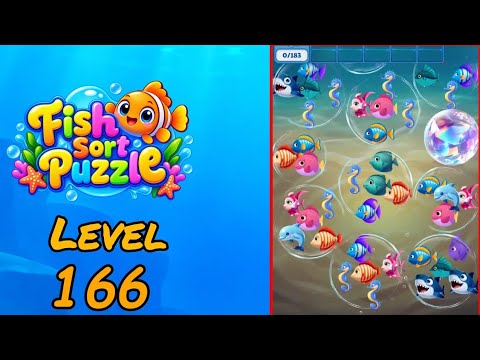
These notes describe visible checkpoints in the Daisy Gaming recording, reviewed on . Use them alongside the video to compare your board. They are not a complete tap-by-tap solution; fish names below describe colors and shapes, not official species names.
Compare the early board at 0:10 →
The recorded progress counter has a goal of 183. This is the on-screen counter, not a move count or a count of fish visible in one frame.
Find the seahorse order and right-side bubble
At the 0:10 checkpoint, the active orders show a seahorse and a blue-faced fish with purple fins. The displayed counter goal is 183. A large iridescent bubble sits on the right around mid-height. Seahorses are visible in the upper-left, upper-center, and lower-left groups, making their curved silhouettes a useful landmark.
Do not group dolphins with the shark-like pieces
Two dark blue, open-mouthed shark-like fish sit together at the bottom right, with another at the upper left. Pale blue dolphins appear in lower groups. Both are blue marine animals, but their portraits and body shapes differ. Use the actual order icon and matching artwork, rather than a general category such as blue fish, to count a triple.
Check the upper seahorses before taking a bottom pair
The early seahorse order makes the upper groups worth inspecting first. Locate the same curved seahorse design and check whether it is selectable in your run. The bottom-right shark-like pair is visually tempting, but it does not match either order shown here. Before picking it, confirm where its third piece is and how the right-side bubble affects your available route.
Video source and version check
This Level 166 mapping was verified from the Daisy Gaming Fish Sort Puzzle playlist on 2026-09-30. The guide targets the Shycheese game with Android package triple.sorting.bubble.fish.match. Updates can change a board, so report a mismatch with the app version and opening layout.