Level 60: early-board notes
These notes describe visible checkpoints in the Daisy Gaming recording, reviewed on . Use them alongside the video to compare your board. They are not a complete tap-by-tap solution; fish names below describe colors and shapes, not official species names.
Compare the early board at 0:10 →
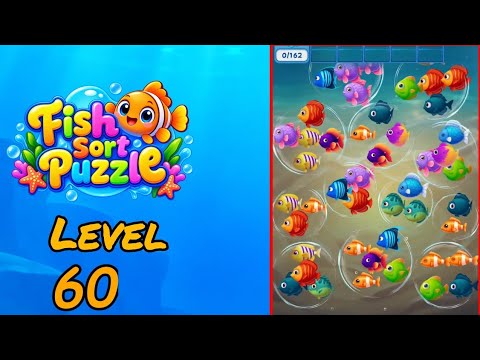
The recorded progress counter has a goal of 162. This is the on-screen counter, not a move count or a count of fish visible in one frame.
Which three designs are currently requested?
The teal fish with dark spots and a green belly shows 0/3, the yellow-purple striped fish shows 1/3, and the plain dark navy fish shows 0/3. A teal pair is exposed in the lower-center-right group, with another teal candidate at the bottom left. These spotted greenish fish differ from the brighter green round pieces elsewhere.
Where are the navy and yellow candidates?
Dark navy fish appear near the upper right, center, lower right, bottom left, and bottom right. A yellow-purple striped pair sits on the middle left. When checking the navy portrait, separate its nearly uniform dark body from the rounded blue fish with pale fins and the narrower blue fish with bright vertical bands.
Which purple and orange shapes differ?
Three scaled purple fish with pink fins share an upper-central group, while an orange-red pair occupies the upper right. Dark purple fish with orange fins and lighter purple-and-yellow round fish appear in central groups. Compare the fins, texture, and rear-body color before adding a purple piece to any matching set.
Video source and version check
This Level 60 mapping was verified from the Daisy Gaming Fish Sort Puzzle playlist on 2026-09-30. The guide targets the Shycheese game with Android package triple.sorting.bubble.fish.match. Updates can change a board, so report a mismatch with the app version and opening layout.