Level 34: early-board notes
These notes describe visible checkpoints in the Daisy Gaming recording, reviewed on . Use them alongside the video to compare your board. They are not a complete tap-by-tap solution; fish names below describe colors and shapes, not official species names.
Compare the early board at 0:10 →
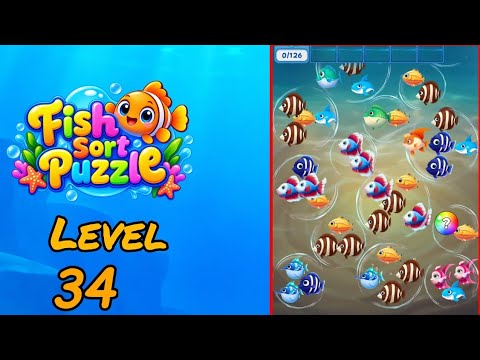
The recorded progress counter has a goal of 126. This is the on-screen counter, not a move count or a count of fish visible in one frame.
Which striped fish is still needed?
At 0:10, the brown fish with white stripes has a completed order, while the small gold fish with orange-and-cream horizontal bands shows 2/3. The distinction matters here: yellow coloring alone is not enough to identify the remaining target. Compare the horizontal bands with the order portrait before choosing a candidate.
Where are the exposed gold candidates?
Gold candidates are visible around the upper right, the central green-fish group, and the lower center. Look across those separate groups rather than assuming the nearest yellow piece belongs to the active order. The lower-center brown-striped pair belongs to the design whose order has already completed at this checkpoint.
What is already in the holding bar?
A dark blue fish with white stripes occupies the holding bar. Matching striped blue pieces are visible on the right, while spotted blue puffers form a separate pair toward the lower left. The angular pink-and-white pair at the lower right is another distinct design; mixing these appearances would make the next comparison harder.
Video source and version check
This Level 34 mapping was verified from the Daisy Gaming Fish Sort Puzzle playlist on 2026-09-30. The guide targets the Shycheese game with Android package triple.sorting.bubble.fish.match. Updates can change a board, so report a mismatch with the app version and opening layout.